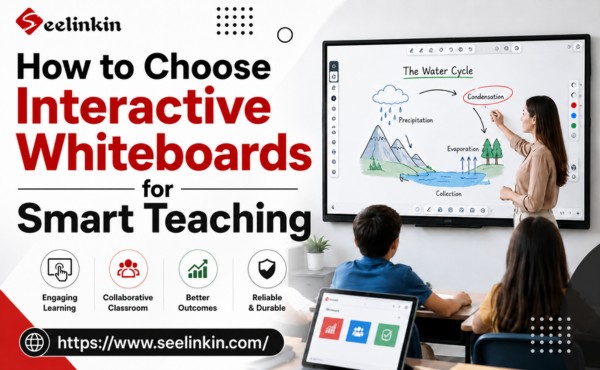
As leading manufacturers continue to advance interactive whiteboard technology, eight key benefits have emerged that support transforming classrooms and improving education. These digital whiteboards bring proven effectiveness by making learning more interactive and engaging for students. Teachers and students experience the advantages of smart whiteboards in the classroom, including access to interactive tools, flexible teaching, and enhanced collaboration, which highlight the power of interactive whiteboard benefits.

Student Engagement with Interactive Whiteboards
Interactive Lessons
Interactive whiteboards change how teachers present lessons in the classroom. These digital whiteboards allow teachers to use touch, drag, and draw features to create interactive activities. Students can solve math problems, label diagrams, or match vocabulary words directly on the interactive digital whiteboard.
Interactive whiteboards support an immersive learning experience. Students see information in different ways, such as through videos, images, and animations. This variety helps students understand topics more deeply and supports interactive learning.
Dynamic Participation
Student engagement grows when students can interact with digital whiteboards. Interactive whiteboards let students come to the front of the classroom and take part in activities. This hands-on approach leads to improved participation levels and increased motivation and participation.
Interactive whiteboard benefits include:
-
- Better engagement for all students
- Opportunities for group work and sharing ideas
- Quick feedback from teachers
Interactive tools make it easy for teachers to involve every student. Students can answer questions, draw, or move objects on the screen. This dynamic participation helps create a lively classroom where everyone feels included.
Interactive whiteboards offer many benefits for education. They help teachers create lessons that are fun and engaging. Classrooms with interactive whiteboards see more active students and higher levels of engagement.
Collaboration in Classrooms
Group Projects
Interactive whiteboards help students work together on group projects. Digital whiteboards allow multiple students to contribute ideas at the same time. Students can write, draw, and move objects on the interactive digital whiteboard during group activities.
Teachers can assign tasks that require students to use smart whiteboards for research or presentations. Students can display charts, images, or notes for the whole classroom to see. This method helps students learn from each other and builds important teamwork skills.
Teacher-Student Interaction
Interactive whiteboards make teacher-student interaction easier and more effective. Teachers can ask questions and invite students to answer directly on the digital whiteboards. This approach increases engagement and helps teachers check understanding in real time.
Teachers can:
-
- Highlight key points during lessons
- Give instant feedback on student answers
- Adjust activities based on student responses
Students feel more comfortable sharing ideas when they use interactive tools. The classroom becomes a space where everyone can participate and learn together. Interactive whiteboards support education by making lessons more interactive and helping students stay involved.
Collaboration in classrooms improves when teachers and students use interactive technology. The benefits of interactive whiteboards include better communication, more active learning, and stronger connections between students and teachers.
Multimedia Integration in Classroom
Videos and Images
Interactive whiteboards make it easy to show videos and images in the classroom. Teachers can display science experiments, historical events, or art pieces with just a few taps. This visual approach helps students understand complex ideas and supports enhanced lessons.
Students can interact with digital whiteboards by moving images or pausing videos to discuss key points. This process increases engagement and makes learning more memorable. Teachers often use smart whiteboards to compare pictures or highlight important details during class discussions.
Audio and Animations
Audio clips and animations add another layer to interactive lessons. Teachers can play sounds, music, or recorded speeches to help students connect with the material. Animations show how things work, such as the water cycle or the movement of planets.
Digital whiteboards allow students to listen and watch at their own pace. This flexibility supports different learning styles and keeps the classroom lively. Interactive features let students control animations or answer questions as they watch.
Benefits of using audio and animations:
-
- Improved understanding of difficult topics
- Increased student participation
- More opportunities for collaboration
Interactive whiteboards help teachers create lessons that are both fun and educational. These tools support education by making information clear and easy to remember. Students enjoy using interactive technology, which leads to better engagement and more effective learning.
Interactive Whiteboard Flexibility in Teaching
Adapting Methods
Interactive whiteboards provide teachers with the ability to modify lessons quickly. When a new topic arises or students need extra help, teachers can instantly change the content displayed. This flexibility allows educators to respond to the needs of their classrooms without wasting time preparing new materials from scratch. Teachers can switch between different teaching styles, such as lecture, discussion, or hands-on activities, with ease. This adaptability enhances the benefits of interactive whiteboards by making lessons more responsive and tailored to student needs. As a result, learning becomes more effective and engaging for students.
Varied Activities
Using digital whiteboards, teachers can incorporate a wide range of classroom activities. For example, they can add quizzes, interactive games, or collaborative tasks that involve all students. Teachers can also embed videos, images, or animations to support different learning styles. This variety keeps students interested and motivated. Teachers can assign group work where students contribute simultaneously on the same whiteboard, fostering collaboration. They can also adapt activities on the fly, such as switching from individual tasks to team challenges. These flexible approaches make classrooms more dynamic and support diverse learning preferences. The benefits include increased engagement, better understanding, and a more inclusive environment where every student can participate actively.
Access to Online Resources
Educational Tools
Interactive whiteboards give teachers and students access to a wide range of educational tools. These tools include online quizzes, math games, and science simulations. Teachers can use digital whiteboards to display interactive maps or virtual labs during lessons.
Students can use smart whiteboards to practice skills with online activities. Many websites offer resources that help students review vocabulary or solve math problems. This access supports different learning needs in the classroom.
Teachers can save time by using ready-made materials from trusted educational sites. They can also adapt these resources to fit the lesson. This flexibility is one of the main benefits of using interactive whiteboards.
Internet Connectivity
Digital whiteboards connect classrooms to the internet. This connection allows teachers to show up-to-date information, such as news articles or weather reports. Students can explore topics in real time and see how lessons relate to the world.
Interactive whiteboards make it easy to watch educational videos or listen to podcasts. Teachers can guide students through virtual field trips or online experiments. These experiences help students understand complex ideas in a simple way.
Advantages of internet connectivity in the classroom:
-
- Quick access to current events
- Opportunities for interactive research
- Sharing resources with the whole class
Students can work together on projects using online tools. Teachers can monitor progress and give instant feedback. This approach increases engagement and helps students develop important digital skills.
Efficient Lesson Management
Saving Materials
Interactive whiteboards help teachers save lesson materials quickly. Teachers can store notes, diagrams, and student work on digital whiteboards with just a few taps. This feature allows teachers to keep important information for future use.
Students can review saved lessons at any time. Teachers can share these materials with students who missed class or need extra practice. This process supports learning and keeps everyone on track.
Reusing Content
Digital whiteboards make it easy to reuse content from past lessons. Teachers can bring up previous notes, activities, or quizzes and adapt them for new topics. This saves time and ensures that important concepts are reviewed.
Interactive features allow teachers to update or change materials as needed. For example, a teacher can add new questions to an old quiz or highlight key points from a previous lesson. This flexibility increases engagement and helps students connect new ideas with what they have already learned.
Benefits of reusing content in the classroom:
-
- Consistent review of important topics
- Less time spent preparing new materials
- More opportunities for interactive activities
Interactive whiteboards support efficient lesson management by making it simple to organize, save, and reuse classroom content. Students benefit from clear lessons and more chances to participate in interactive learning.
Interactive Whiteboard Support for Learning Styles
Visual and Auditory
Interactive whiteboards help students who learn best by seeing and hearing. Teachers can use digital whiteboards to show charts, diagrams, and pictures. These tools make lessons clear and easy to understand. Students can listen to audio clips or watch short videos during class. This approach helps students remember information better.
Smart whiteboards allow teachers to highlight important points. They can play sounds or music to support different subjects. Visual and auditory features make the classroom more interactive and fun for everyone.
Personalized Instruction
Every student learns in a unique way. Interactive whiteboards give teachers the ability to adjust lessons for each student. Teachers can create activities that match different skill levels. For example, some students may need extra practice with math problems, while others work on reading tasks.
Digital whiteboards let students move at their own pace. Teachers can assign interactive quizzes or games to small groups. This flexibility supports personalized learning and helps all students succeed.
Benefits of personalized instruction with interactive whiteboards:
-
- Students get lessons that fit their needs
- Teachers can track progress easily
- The classroom becomes more inclusive
Interactive features encourage students to take part in their own learning. Teachers can use feedback tools to see who needs more help. This process makes the classroom a place where every student can do their best.
Teacher Support and Development
Training Opportunities
Integrating interactive whiteboards into the classroom helps teachers grow their skills. Many schools offer training sessions that focus on using digital whiteboards for lessons. These sessions show teachers how to use interactive features, such as drawing tools and multimedia integration.
Teachers who receive training can create more engaging lessons for students. They learn how to use interactive activities that boost student participation and learning. Training also helps teachers stay updated on the latest teaching methods.
Professional Collaboration
Interactive whiteboards make it easier for teachers to work together. Teachers can share lesson plans, activities, and digital resources with each other. This sharing leads to better teamwork and more creative ideas for the classroom.
Benefits of professional collaboration with digital whiteboards:
-
- Teachers can co-create interactive lessons.
- Sharing resources saves time and improves lesson quality.
- Teachers can support each other with tips and feedback.
Many schools use online platforms where teachers upload and download interactive materials. These platforms help teachers connect and learn from one another. Collaboration increases engagement among teachers and helps everyone improve their teaching skills.
Professional development resources for interactive whiteboards include webinars, online communities, and support forums. These resources give teachers a place to ask questions and share experiences. Teachers who use these tools can bring new ideas and strategies to their classrooms, helping students succeed.
Conclusion
Interactive whiteboards bring many benefits to classrooms. These tools increase engagement, support learning, and help students take part in interactive lessons. The benefits of using interactive whiteboards include flexible teaching, easy access to digital whiteboards, and smart whiteboards for every classroom.